
01
Context that survives the session
Store architecture notes, prompts, tasks, decisions, and codebase knowledge once. Pick them up from any compatible agent later.
VContext is a versioned context layer that keeps project knowledge in sync across AI coding sessions and machines.
Context vanishes between sessions, tools, and machines. Snapshots, branches, and MCP keep every agent on the same page.
curl -fsSL https://vcontext.dev/install.sh | bash8ef92a1Problem
Every time you switch between Codex, Claude Code, OpenCode, or any other coding agent, the new model starts cold. Decisions from the previous session, project-specific conventions, and recent changes are gone — unless you manually reconstruct them in a prompt.
Static AGENTS.md files and docs drift out of date. Agent memory is isolated to one tool. VContext makes project context persistent, versioned, and accessible across any compatible agent.
Capabilities
VContext turns scattered agent memory into explicit, inspectable project knowledge.
Store architecture notes, prompts, tasks, decisions, and codebase knowledge once. Pick them up from any compatible agent later.
Work directly from your terminal or let models read and write context through MCP. Both surfaces resolve to the same project history.
Branches, immutable snapshots, history, diffs, and merges bring Git-like control to the knowledge your agents depend on.
A lightweight daemon and project-scoped SQLite storage keep your context fast and available without requiring a cloud account.
Attach descriptions to files and directories, track change notes, and let each agent understand where work belongs before editing.
Connect VContext Cloud to sync branches, collaborate through shared projects, and move the same context between machines and teammates.
Comparison
Versions source code and files. Tracks changes, supports branches and merges. Does not manage project knowledge, decisions, or agent context.
Static documentation you write by hand. Useful as a reference, but does not version history, does not branch, and requires manual updates.
Built into each coding agent. Ephemeral or isolated per tool. Does not transfer between Codex, Claude, OpenCode, or other agents.
Versioned, branchable, shareable context layer. Complements Git by tracking the knowledge that lives around your code. Works across agents via MCP.
How it works
No context archaeology. No hand-written catch-up prompt every time you switch tools.
One command installs the native CLI. The daemon starts automatically when VContext needs it.
Initialize a project, record the knowledge that matters, and connect any MCP-compatible agent.
Agents read the same branch-aware context locally. Add Cloud only when you want remote sync or collaboration.
$ vcontext status
vcontext / status
Last change
Create document "Architecture"
$
Compatible by default
VContext stays underneath your tools, not in the way of them.
AI coding agent by OpenAI
AI assistant by Anthropic
Open-source coding agent
Direct CLI for human workflows
Automatic hook integration
Standard protocol, compatible tools
VContext Cloud
Keep the local workflow you already trust, then add a remote when context needs to travel across people, machines, or agents.
Push and pull versioned context without flattening it into another document or losing branch history.
Create personal or organization workspaces and keep team context attached to the project it describes.
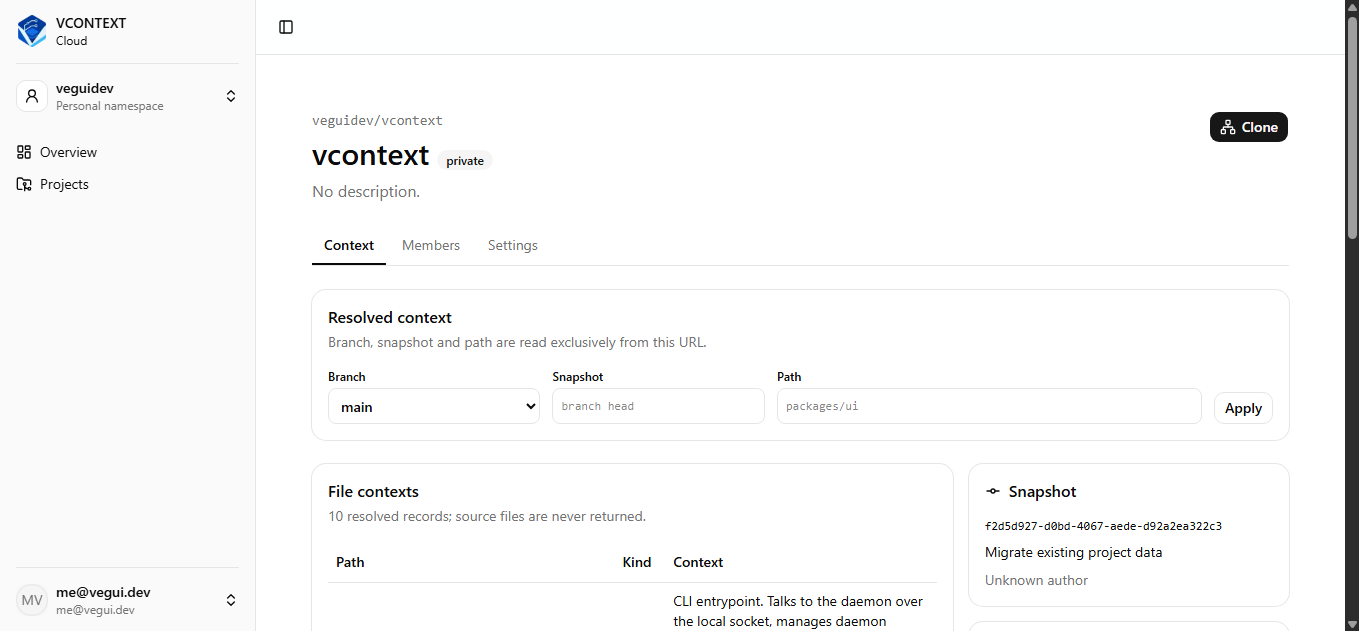
Clone a context repository and continue from its current branch and snapshot wherever the work moves next.
Pricing
Start using the complete local context workflow now. Paid options may arrive as collaboration and hosted capabilities expand.
For developers and agents that need durable, versioned context.
No card required. Pricing may evolve as hosted collaboration grows.
FAQ
VContext is a versioned context layer for AI coding agents. It stores decisions, tasks, documentation, changes, and project knowledge in a structured, branchable, and synchronizable format that agents can read and write through CLI or MCP.
No. Git versions source code. VContext versions the project context that accompanies code — decisions, documentation, tasks, and agent prompts. The two tools complement each other.
Documents (architecture notes, specifications), tasks, change notes, file context (descriptions attached to files and directories), and prompts. Everything is organized in projects with branch and snapshot history.
Any agent that supports MCP — including OpenAI Codex, Claude Desktop, and OpenCode — can read and write VContext. The CLI also works directly from any terminal.
VContext implements the Model Context Protocol, exposing its project context as MCP resources that compatible agents can query and modify. Each project's documents, tasks, and changes become available to the agent through standard MCP tools.
The VContext CLI is open source and available on GitHub at github.com/VeguiDev/vcontext. The Cloud service at app.vcontext.dev is a separate hosted product.
Locally, in a project-scoped SQLite database managed by the VContext daemon. When you connect VContext Cloud, context can also be synced and shared across machines.
VContext Cloud enables branch-level sync and collaboration across team members. Each team member works with the same project context, synchronized through the cloud layer.
Start here
Install locally in one line. Add Cloud later if the project needs to travel.
curl -fsSL https://vcontext.dev/install.sh | bash